

Add Photos of Your Work to Win More Jobs
Show up to 4 photos of finished jobs on your FixAm profile. What makes a good work photo, how photos are checked and why customers pick pros with photos.
A customer choosing between two plumbers in Madina cannot see your skill from a name and a star rating. A photo of a clean bathroom fitting can show it. You can add up to 4 work photos to your profile. They appear under My Work on your public page, after a quick check by the FixAm team.
Add a photo in My Work
- Open the FixAm app and tap the Dashboard tab.
- Under Quick actions, tap My Work.
- Tap + Add your first photo, or Add photo if you already have some.
- Choose Take Photo or Choose from Library.
- The app asks Tag this photo? Pick Before, After or No tag.
The photo uploads and shows In review until the team checks it. On mobile data a large photo can take a little while.
To change the order customers see, use the up and down arrows on each photo. The first photo is the one customers notice. To take a photo down, tap the remove button on it and confirm with Remove. Removing is instant.
You can also manage photos on the website. Sign in at fixam.pro and open the My Work tab.
What makes a photo that wins jobs
You have 4 spaces. Use each one for a different kind of job you want more of.
- Show the finished work. A neat socket board or a fresh coat of paint on a whole wall. Half-done work rarely helps.
- Use Before and After. A blocked drain and the same drain running clear tells a story in two photos. Tag them so customers see the labels.
- Light it well. Daylight, or every light in the room switched on. Dark photos hide the quality you want to show.
- Get close enough. Fill the frame with the work, not the street or the ceiling.
- Keep it clean. Sweep up the offcuts and move tools out of the shot before you take it.
- Only your own jobs. Photos from the internet or from another pro damage trust the first time a customer recognises one.
Take the photo before you leave the site. It is hard to go back later.
Why photos are checked before they show
A person on the FixAm team looks at every new photo before customers can see it. The app says this usually happens within a day. The check keeps profiles honest, so customers can trust that the photos show real jobs.
When the team decides, the app sends you a notification:
- Work photo approved: the photo is now on your profile.
- Work photo not approved: the photo stays hidden and shows Not approved in My Work. Remove it and add a different one.
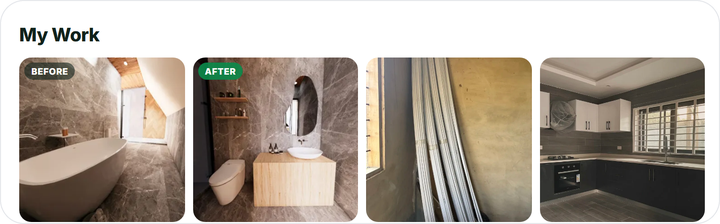
Your public profile only shows the My Work section once at least one photo is approved. Photos are one part of a profile that wins jobs. How to get more jobs covers the rest: your bio, quick replies and reviews.