

How to Get More Jobs as a Tradesperson in Ghana
Practical ways plumbers, electricians, masons and other pros win more customers on FixAm: work photos, a clear bio, fast WhatsApp replies and reviews.
If you are asking how to get more jobs as a plumber, electrician or mason, start with what a customer sees before they call. On FixAm they search by trade and area, open a few profiles and contact the pro who looks most trustworthy. You cannot buy a better spot. You can make your profile the obvious choice, answer faster than the next pro, and collect the reviews that settle the decision.
Make your profile the one customers pick
A customer gives your profile a few seconds. In that time they look at your face, your work and your reviews.
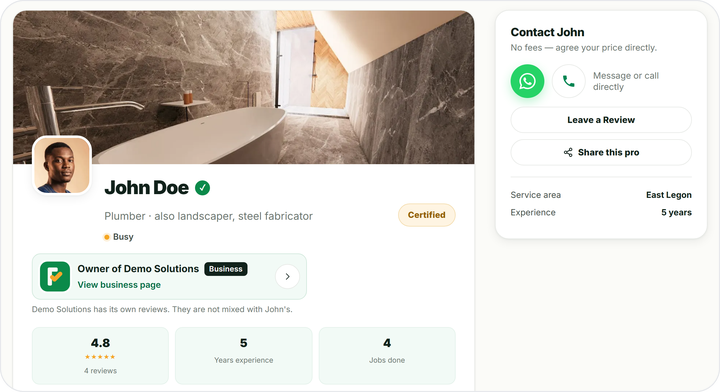
A clear face photo. A real photo of you, in daylight, looking at the camera. Logos and cartoons look like you have something to hide. Change it in Edit profile on your dashboard.
A bio that answers their questions. Say your trade, your years of experience, the areas you cover, the jobs you are best at and the languages you speak. Keep it to 3 or 4 lines. For example:
Write "P.O.P ceilings" or "borehole pump repair" the way customers say it. Vague bios like "all types of work" tell the customer nothing.
Services that match real jobs. You can tick up to 10 services from the list for your trade. Tick the jobs you do well and want more of. Choose the services you offer shows how.
Photos of finished work. You have 4 photo spaces. Use them for your best, cleanest jobs, with Before and After tags where you can. Add photos of your work has tips for photos that sell.
Honest availability. When you are fully booked, set yourself to Busy from the dashboard. Customers then know to wait, rather than call and hear no.
Reply fast and quote clearly
FixAm has no in-app inbox. Customers tap WhatsApp or Call on your profile and reach your phone directly. That makes your phone the shop counter.
Your dashboard counts every profile view, WhatsApp tap and call. Watch them together. Many views but few WhatsApp taps usually means the profile is not convincing yet. Work on your photos and bio first.
- Answer the same day. A customer with a leaking pipe messages two or three pros. The first clear answer often wins the job.
- Call back missed calls. A short "Sorry, missed your call. What needs fixing?" is enough.
- Ask for a photo. On WhatsApp, ask the customer to send a picture of the problem. You can then give a better quote and bring the right parts.
- Quote in writing, in GHS. Split labour and materials, and say what is included. "Labour GHS 300. Materials about GHS 450, receipts shown." A line like that stops arguments later.
- Agree the visit time and keep it. If you will be late, send a message before the customer has to ask.
When the job is agreed, you can send a proper invoice from the FixAm app, with your MoMo number printed on it. How to send an invoice from your phone shows the steps.
Turn every finished job into a review
Reviews are the strongest signal on your profile. Every FixAm review is confirmed with an SMS code sent to the customer's phone, so customers know they are real.
Ask at the right moment: when the job is done, the customer is happy and you are still standing there. Send your review link on WhatsApp right away, while they remember. How to ask customers for a review has a message you can copy.
Reply to the reviews you get, good and bad. A short, calm reply shows the next customer how you treat people. Once you have at least 10 reviews and a rating of 4.0 or more, your profile on fixam.pro shows the Trusted Pro label.
Never pay for reviews or ask friends to post them. Each review needs the reviewer's own phone and SMS code, and one number can review you only once in 60 days.
Share your profile outside FixAm
Word of mouth still brings work. Give it somewhere to land.
- Put your profile link in your WhatsApp status and your WhatsApp Business description.
- Print your QR business card and stick it on your van, toolbox or shop front.
- Send your link to past customers so they can save your number and leave a review.
Open Share profile on your dashboard for your link and QR card. Share your profile link and QR business card explains each option.
Not on FixAm yet? How to join as a pro walks you through the 4 steps.